A keyboard is one of the most important input devices used with computers, laptops, tablets, and other digital devices. Whether you are writing documents, coding applications, playing games, or simply browsing the internet, a keyboard allows you to communicate with your device quickly and efficiently.
With different keyboard layouts, switches, sizes, and features available today, choosing the right keyboard can sometimes be confusing. In this guide, we will understand what a keyboard is, how it works, the different types of keyboards, and how to choose the right one.
What Is a Keyboard?
A keyboard is an input device that allows users to enter text, numbers, commands, and other instructions into a computer or digital device.
A standard keyboard contains different groups of keys, including alphabet keys, numeric keys, function keys, navigation keys, and special control keys.
How Does a Keyboard Work?
When you press a key, the keyboard detects the keypress and sends an electrical signal to the computer. The operating system then interprets that signal and performs the corresponding action.
For example:
- Pressing A enters the letter “A”.
- Pressing Enter creates a new line or confirms an action.
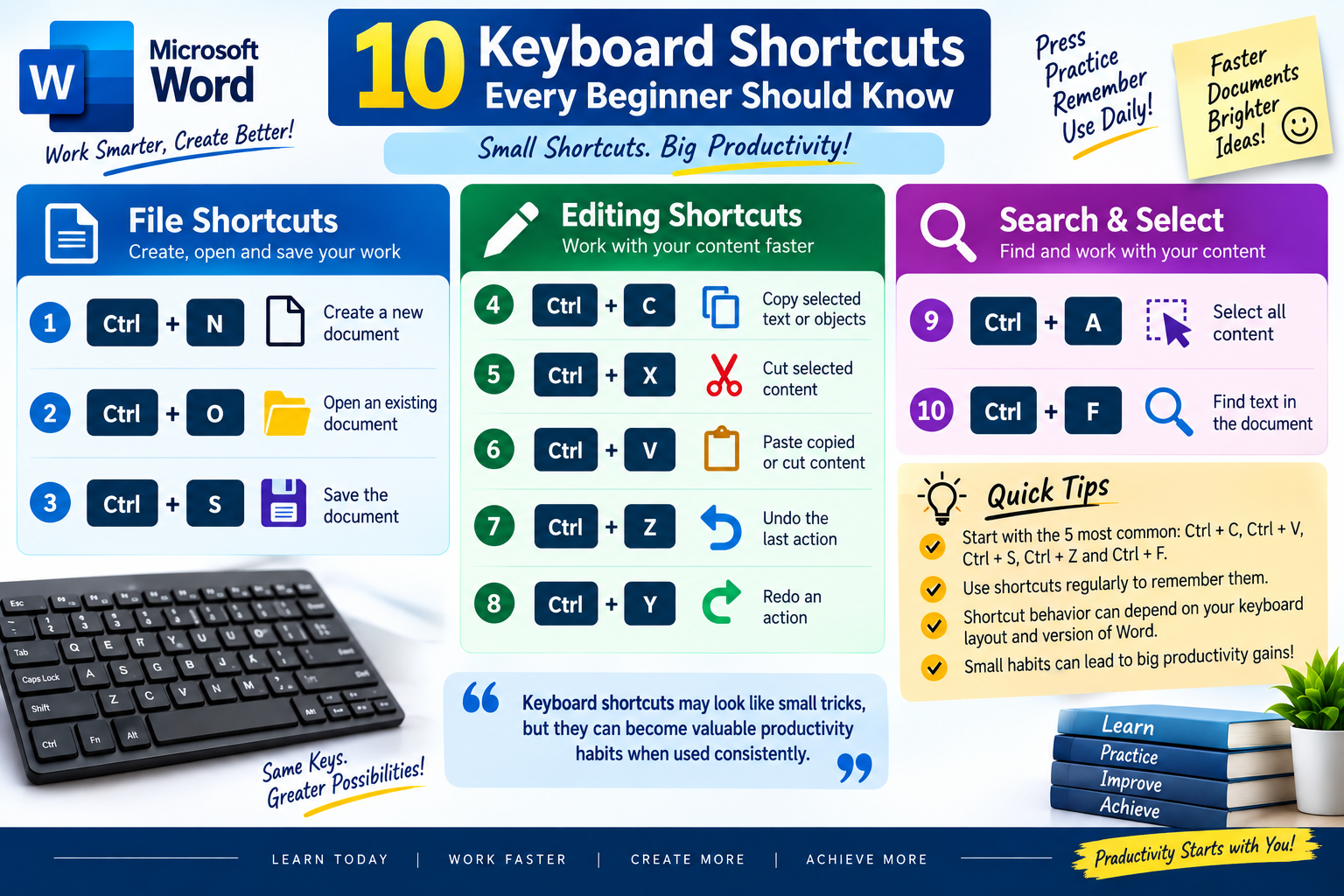
- Pressing Ctrl + C copies selected content.
- Pressing Ctrl + V pastes copied content.
Main Components of a Keyboard
A typical keyboard consists of several important components:
- Keycaps
- Switches or membrane mechanisms
- Circuit board
- Controller
- USB or wireless connection
- Keyboard frame and case
Types of Keyboards
There are many types of keyboards designed for different users and purposes. The most common types include membrane keyboards, mechanical keyboards, wireless keyboards, ergonomic keyboards, and gaming keyboards.
1. Membrane Keyboard
Membrane keyboards use a rubber or silicone membrane underneath the keys. They are generally affordable, lightweight, and quieter than many mechanical keyboards.
They are commonly used in:
- Offices
- Schools
- Home computers
- Basic desktop setups
2. Mechanical Keyboard
Mechanical keyboards use individual mechanical switches beneath each key. These switches provide a more tactile and responsive typing experience.
Advantages of Mechanical Keyboards
- Excellent typing feedback
- High durability
- Different switch options
- Suitable for gaming and programming
- Keys can often be customized
Popular Mechanical Switch Types
Mechanical switches are commonly divided into three categories:
- Linear switches – Smooth key movement with no tactile bump.
- Tactile switches – Provide noticeable feedback when the key is pressed.
- Clicky switches – Provide tactile feedback along with an audible clicking sound.
3. Wireless Keyboard
Wireless keyboards connect to computers without a traditional wired connection. They usually use Bluetooth or a dedicated wireless receiver.
Wireless keyboards are useful when you want a cleaner and more flexible workspace.
4. Ergonomic Keyboard
Ergonomic keyboards are designed to provide a more comfortable typing position. Their shape and key arrangement can help users maintain a more natural hand and wrist position.
They can be particularly useful for people who spend many hours typing.
5. Gaming Keyboard
Gaming keyboards are designed specifically for gamers. They often include features such as RGB lighting, programmable keys, anti-ghosting, and fast-response switches.
Important Keyboard Keys
Although keyboards can have different layouts, many keys perform standard functions.
Function Keys
The function keys are usually labelled F1 through F12. Their purpose depends on the operating system and application being used.
For example:
- F1 is commonly associated with Help.
- F5 is commonly used to refresh a webpage.
- F11 can be used to enter full-screen mode in many browsers.
Modifier Keys
Modifier keys are used together with other keys to perform shortcuts.
Common modifier keys include:
- Ctrl
- Alt
- Shift
- Windows or Command
- Fn
Navigation Keys
Navigation keys help users move around documents, webpages, and interfaces.
Common navigation keys include:
- Arrow keys
- Home
- End
- Page Up
- Page Down
- Insert
- Delete
Keyboard Shortcuts That Save Time
Keyboard shortcuts can significantly improve productivity because they allow users to perform common actions without repeatedly using a mouse.
Common Windows Shortcuts
| Shortcut | Function |
|---|---|
| Ctrl + C | Copy |
| Ctrl + V | Paste |
| Ctrl + X | Cut |
| Ctrl + Z | Undo |
| Ctrl + Y | Redo |
| Ctrl + S | Save |
| Ctrl + A | Select All |
| Ctrl + F | Find |
How to Choose the Right Keyboard
Choosing a keyboard depends on how you plan to use it. A keyboard that works perfectly for an office user may not be ideal for a professional gamer or programmer.
Step-by-Step Selection Guide
- Identify your primary use – Decide whether you mainly type, code, game, or perform office work.
- Choose the keyboard type – Select membrane, mechanical, wireless, ergonomic, or gaming based on your requirements.
- Consider the layout – Choose between full-size, tenkeyless, compact, or other layouts.
- Check connectivity – Decide whether you need USB, Bluetooth, or wireless connectivity.
- Consider comfort – Look for suitable key spacing, wrist support, and typing angle.
- Set your budget – Compare features and build quality within your preferred price range.
Keyboard Maintenance Tips
Proper maintenance can help extend the life of your keyboard and keep it working reliably.
Keep Your Keyboard Clean
Dust, food particles, and other debris can accumulate underneath the keys. Regular cleaning can prevent keys from becoming difficult to press.
Simple Cleaning Steps
- Disconnect the keyboard before cleaning.
- Turn it upside down and gently shake out loose debris.
- Use compressed air to remove dust.
- Wipe the surface with a soft, dry or slightly damp cloth.
- Avoid spilling liquids directly onto the keyboard.
Wired vs Wireless Keyboards
Both wired and wireless keyboards have advantages and disadvantages.
Wired Keyboard
Pros:
- Reliable connection
- No battery required
- Usually lower latency
- Simple plug-and-play setup
Cons:
- Cable management is required
- Less flexibility in desk placement
Wireless Keyboard
Pros:
- Cleaner desk setup
- Easy to move around
- No cable connection to the computer
Cons:
- Requires batteries or charging
- Wireless interference can sometimes occur
- Some models may have slightly higher latency
Mechanical vs Membrane Keyboard
Mechanical and membrane keyboards are two of the most popular choices.
A mechanical keyboard is generally preferred by users who want better tactile feedback, durability, and customization. A membrane keyboard is often a better option for users who want something affordable, simple, and quiet.
Which One Should You Choose?
Choose a mechanical keyboard if:
- You type for long periods.
- You are a programmer or writer.
- You want tactile feedback.
- You enjoy customizing your keyboard.
- You want a durable keyboard.
Choose a membrane keyboard if:
- You need an affordable option.
- You prefer quieter typing.
- You use a keyboard for basic tasks.
- You do not need advanced customization.
Final Thoughts
A keyboard may look like a simple computer accessory, but choosing the right one can have a significant impact on productivity, comfort, and overall user experience.
From affordable membrane keyboards to customizable mechanical and ergonomic models, there are options available for almost every type of user. Before purchasing a keyboard, consider your usage, preferred layout, connectivity, comfort, and budget.
The best keyboard is ultimately the one that matches your specific needs and provides a comfortable and reliable typing experience.