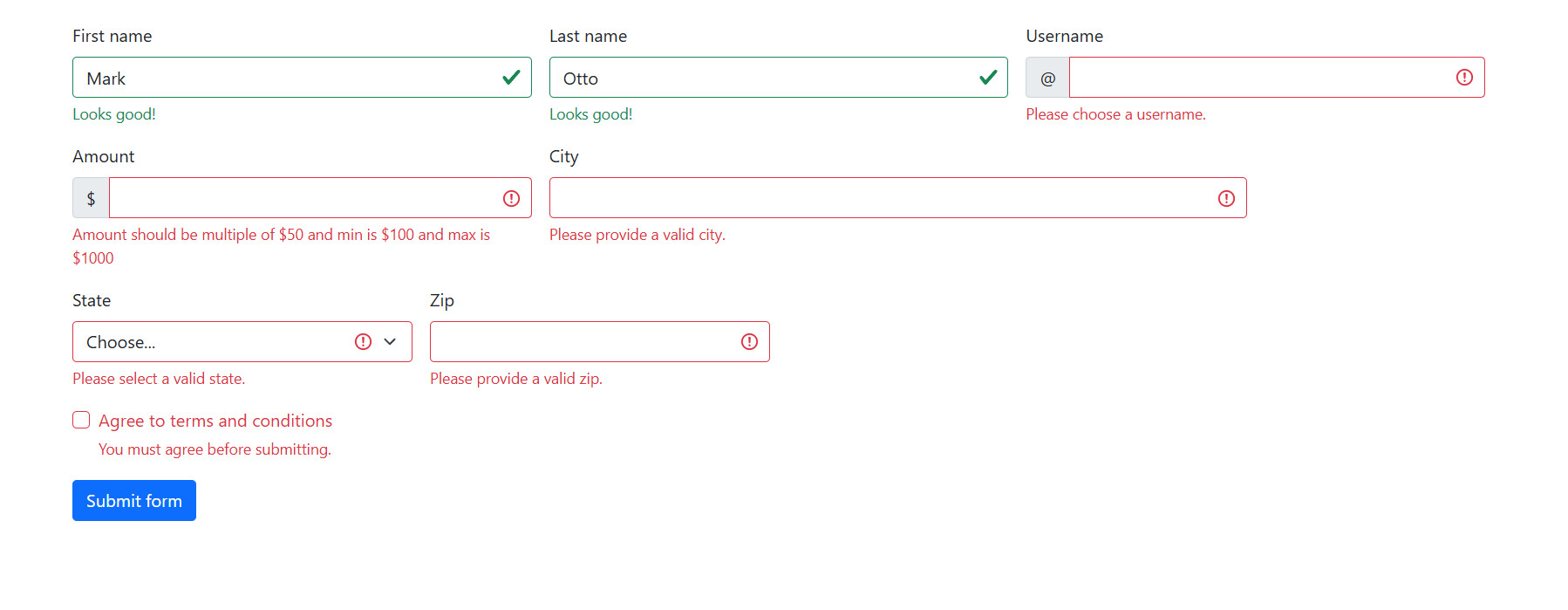
BS5 Form Validation
In Bootstrap 5, validation isn’t just about logic; it’s about providing clear, visual cues to the user. This is achieved through a specific hierarchy of “feedback” classes that respond to the state of your form inputs.
Here is how these classes work together to create an interactive experience:
The “Trigger” Class: was-validated
Think of was-validated as the master switch. By default, Bootstrap doesn’t show success or error styles because it doesn’t want to yell at a user who hasn’t finished typing yet.
Once you apply this class to the <form> element (usually via JavaScript after the user hits “Submit”), Bootstrap looks at every input inside. It checks them against HTML5 attributes like required, minlength, or type="email".
- If an input meets the requirements, it gets a green border and a checkmark icon.
- If it fails, it gets a red border and an exclamation icon.
The Messaging Containers
While the borders provide the “status,” these two classes provide the “reasoning” or “encouragement.”
valid-feedback: This is your success container. It remains completely invisible until the parent form has thewas-validatedclass and the specific input is valid. It’s perfect for messages like “Looks good!” or “Username available.”invalid-feedback: This is your error container. It stays hidden until the input fails a validation check. Once visible, it displays in red text, telling the user exactly what went wrong (e.g., “Please enter a valid zip code”).
Why this structure matters
This system allows you to write your error and success messages directly in your HTML. You don’t have to manually show or hide them with complex CSS or JavaScript; Bootstrap handles the visibility logic automatically based on the validity of the field.
Example:
<form class="row g-3 was-validated" validate>
    <div class="col-md-4">
        <label for="validation01" class="form-label">First name</label>
        <input type="text" class="form-control" id="validation01"
        value="Mark" required minlength="5">
        <div class="valid-feedback">
            Looks good!
        </div>
        <div class="invalid-feedback">
            not good!
        </div>
    </div>
    <div class="col-md-4">
        <label for="validation02" class="form-label">Last name</label>
        <input type="text" class="form-control" id="validation02"
        value="Otto" required>
        <div class="valid-feedback" id="last-name-valid">
            Looks good!
        </div>
    </div>
    <div class="col-md-4">
        <label for="validationUsername" class="form-label">Username</label>
        <div class="input-group has-validation">
            <span class="input-group-text" id="inputGroupPrepend3">@</span>
            <input type="text" class="form-control" id="validationUsername" required minlength="10">
            <div id="validationUsernameFeedback" class="invalid-feedback">
                Please choose a username.
            </div>
        </div>
    </div>
    <div class="col-md-4">
        <label for="validationUsername" class="form-label">Amount</label>
        <div class="input-group has-validation">
            <span class="input-group-text" id="inputGroupPrepend3">$</span>
            <input type="number" class="form-control" id="validationUsername"
            min="100" max="1000" step="50" required >
            <div id="validationUsernameFeedback" class="invalid-feedback">
                Amount should be multiple of $50 and min is $100 and max is $1000
            </div>
        </div>
    </div>
    <div class="col-md-6">
        <label for="validation03" class="form-label">City</label>
        <input type="text" class="form-control" id="validation03" required>
        <div id="validation03Feedback" class="invalid-feedback">
            Please provide a valid city.
        </div>
    </div>
    <div class="col-md-3">
        <label for="validation04" class="form-label">State</label>
        <select class="form-select" id="validation04" required>
            <option selected disabled value="">Choose...</option>
            <option>...</option>
        </select>
        <div id="validation04Feedback" class="invalid-feedback">
            Please select a valid state.
        </div>
    </div>
    <div class="col-md-3">
        <label for="validation05" class="form-label">Zip</label>
        <input type="text" class="form-control" id="validation05" required minlength="6">
        <div id="validation05Feedback" class="invalid-feedback">
            Please provide a valid zip.
        </div>
    </div>
    <div class="col-12">
        <div class="form-check">
            <input class="form-check-input" type="checkbox" value="" id="invalidCheck3" required>
            <label class="form-check-label" for="invalidCheck3">
                Agree to terms and conditions
            </label>
            <div id="invalidCheck3Feedback" class="invalid-feedback">
                You must agree before submitting.
            </div>
        </div>
    </div>
    <div class="col-12">
        <button class="btn btn-primary" type="submit">Submit form</button>
    </div>
</form>Output: